Text Splitter
Text Splitter is used to split large documents into smaller chunks or segments. This is particularly useful when dealing with lengthy texts that exceed the input size limitations of language models. By breaking down the text into manageable pieces, it allows for more efficient processing and retrieval of relevant information.
Use of Text Splitter:
- OverCome model Input Limitations: Many language models have a maximum token limit for input. Text Splitters help to divide large documents into smaller chunks that fit within these limits.
- Downstream Processing: Text splitting improves nearly every llm power task
| Task | Benefit of Text Splitter |
|---|---|
| Embedding | Smaller chunks lead to more accurate embeddings, as they capture specific contexts better. |
| Sementic Search | Enables more precise retrieval of relevant information by indexing smaller, focused segments. |
| Summarization | Prevent hallucination and topic drift by focusing on smaller, coherent sections of text. |
Types of Text Splitters
- Length-based Splitters
- Text Structure-based Splitters
- Document Structure-based Splitters
- Sementic Meaning Based Splitters
Note: use
pip install -U langchain-text-splittersto install text splitters package.
Length-based Splitters
Length-based Splitters divide text based on character count count. They are simple and effective for many use cases.THe main drawback is that they may split sentences or paragraphs without considering the structure and meaning of the text. which means
- It can split in the middle of a sentence.
- It can split in the middle of a paragraph.
- It can split in the middle of a word.
Example:
from langchain_text_splitters import CharacterTextSplitter
text ="""
Text is naturally organized into hierarchical units such as paragraphs, sentences, and words. We can leverage this inherent structure to inform our splitting strategy, creating split that maintain natural language flow, maintain semantic coherence within split, and adapts to varying levels of text granularity. LangChain’s
"""
text_splitter = CharacterTextSplitter(
    chunk_size=100,
    chunk_overlap=0,
    separator=""
)
texts = text_splitter.split_text(text)
print(texts)
chunk_size: The maximum size of each chunk in characters.chunk_overlap: The number of characters that overlap between consecutive chunks.separator: The character used to split the text (e.g., space, newline, etc.).
.split_text() vs .split_documents()
.split_text(): This method takes a single string of text as input and splits it into smaller chunks based on the specified chunk size and overlap. It returns a list of strings, where each string represents a chunk of the original text..split_documents(): This method takes a list of Document objects as input and splits each document into smaller chunks. It returns a list of Document objects, where each Document represents a chunk of the original documents, preserving the metadata.
using loader with Text Splitter
from langchain_community.document_loaders import TextLoader
from langchain_text_splitters import CharacterTextSplitter
# Load the document
loader = TextLoader("example.txt",encoding="utf-8")
documents = loader.load()
# Create a CharacterTextSplitter instance
text_splitter = CharacterTextSplitter(
    chunk_size=100,
    chunk_overlap=0,
    separator=""
)
# Split the loaded documents into smaller chunks
split_docs = text_splitter.split_documents(documents)
for doc in split_docs:
    print(doc.page_content)
    print(doc.metadata)
print(f"Total chunks created: {len(split_docs)}")
Text Structure-based Splitters
Text Structure-based Splitters divide text based on natural text structures such as paragraphs, sentences, or lines. These splitters are more sophisticated than length-based splitters as they consider the inherent organization of the text, leading to more coherent and contextually relevant chunks.
It break text into smaller segments based on its structural elements, such as paragraphs, sentences, or lines. This approach helps maintain the natural flow and meaning of the text, making it easier for language models to process and understand.
If the entire chunk is less than the specified chunk size, it will be returned as a single chunk. If the chunk exceeds the specified size, it will be recursively split into smaller segments until they fit within the chunk size limit.It splits text by first attempting to split by larger structural elements (like paragraphs) and then progressively smaller ones (like sentences and words) until the desired chunk size is achieved.
Example:
from langchain_text_splitters import RecursiveCharacterTextSplitter
text ="""
Text is naturally organized into hierarchical units such as paragraphs, sentences, and words. We can leverage this inherent structure to inform our splitting strategy,


creating split that maintain natural language flow, maintain semantic coherence within split, and adapts to varying levels of text granularity. LangChain’s
"""
text_splitter = RecursiveCharacterTextSplitter(
    chunk_size=100,
    chunk_overlap=0,
)

texts = text_splitter.split_text(text)
print(texts)
Document Structure-based Splitters
It is similar to Text Structure-based Splitters but it is specifically designed to handle documents with well-defined structures, such as HTML or XML files,Python Code files,Markdown files etc. These splitters utilize the inherent organization of the document to create meaningful chunks that align with the document’s sections, headings, or other structural elements.
Example:
from langchain_text_splitters import RecursiveTextSplitter,Language
text ="""
class HelloWorld:
    def __init__(self):
        pass

    def greet(self):
        print("Hello, World!")

hello = HelloWorld()
hello.greet()
"""
text_splitter = RecursiveTextSplitter.from_language(
    language=Language.PYTHON,
    chunk_size=100,
    chunk_overlap=0,
)
texts = text_splitter.split_text(text)
print(texts)
How Document/ Text Splitters work?
Working of text splitter can be understood in the following steps:
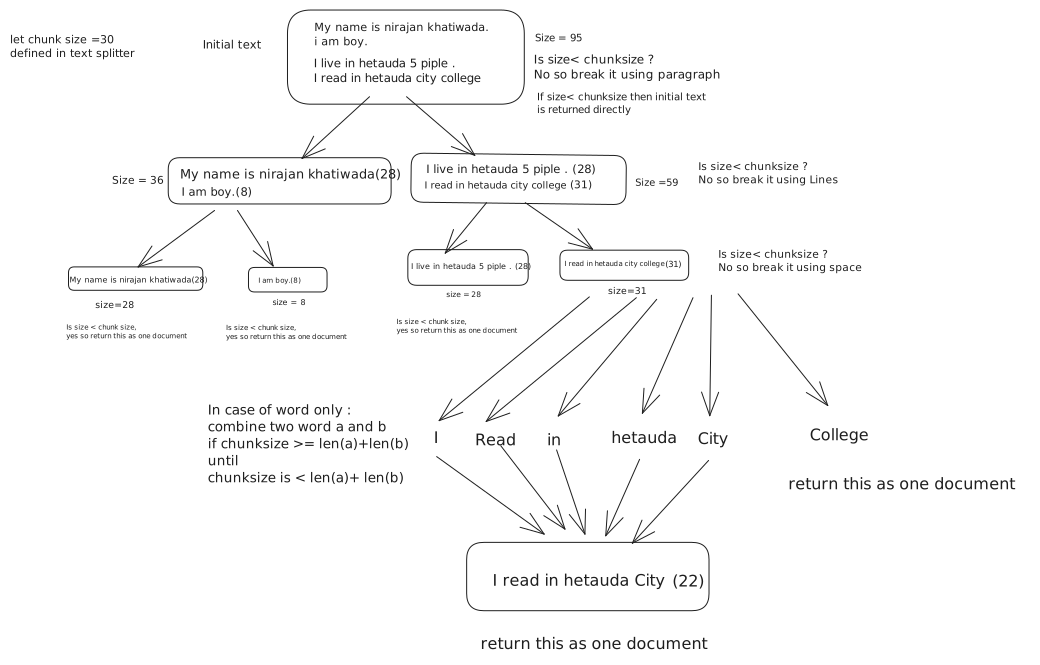
In text splitter the text is splitted in format - paragraphs - line - word
In case of Document Splitter pf python code it split based on - class - function - blank line - line
- wordIn case of Document Splitter of Markdown files it split based on - heading - sub-heading - paragraph - line - word
Semantic Meaning Based Splitters
Sementic Meaning Based Splitters divide text based on the semantic meaning of the content.
Sometime paragraph can contain multiple topics or ideas. for example consider the following paragraph: “Artificial Intelligence (AI) is transforming various industries. In healthcare, AI is being used for disease diagnosis and personalized treatment plans. In finance, AI algorithms are employed for fraud detection and risk assessment.IPL trophy was won by Gujarat Titans in 2022.
My name is John and I love programming.I enjoy solving complex problems and building innovative applications.”
If we use splitters based on length or text structure, we might end up with chunks that mix different topics together like AI and IPL in one chunk, which can confuse the model during processing.so we use Semantic Meaning Based Splitters to split the text based on the underlying topics or themes, ensuring that each chunk focuses on a single subject.
Note: Semantic Meaning Based Splitters are still an emerging area of research and may not be as widely available or mature as other types of splitters so we will not cover it here in detail.